

most of us use Google Maps just to find the quickest route to a new restaurant or to check how much traffic is ruining our commute. I can tell you that Google Maps in 2026 is no longer just a “map.” It is a sophisticated AI-driven travel consultant that most people are only using at 10% of its capacity. 🚗
If you feel like you’re constantly getting turned around in airports, forgetting where you parked, or worried about your digital footprint while traveling, you’re in the right place. In this comprehensive guide, I’m going to share the “Skyscraper” of Google Maps tips—going deeper than any basic listicle you’ve seen before. We will explore features that have existed for years but remain hidden gems, alongside the latest 2026 AI updates.
Table of Contents
1. Digital Time Travel with Street View Imagery 🕰️
One of the most profound yet underutilized features is the ability to see how a location has evolved over decades. Google has been archiving panoramic imagery since 2007, creating a massive visual history of our planet. This isn’t just for nostalgia; it’s a powerful tool for real estate professionals and urban historians.
- How to access: Enter Street View mode, tap the screen once, and select “See more dates.”
- Expert Use Case: Researching the development of a neighborhood before buying property or documenting the impact of urban planning over a 15-year period.
2. Advanced Privacy: Using Incognito Mode for Stealth Navigation 🕵️
Data privacy is the currency of 2026. If you are searching for sensitive locations—perhaps a surprise gift shop or a medical facility—and you don’t want these searches to influence your future ad profile or appear in your “Your Timeline,” Incognito Mode is mandatory.
Simply tap your profile icon and toggle “Turn on Incognito Mode.” This pauses your location history for that session. According to cybersecurity research, managing your location history is a primary step in reducing your digital shadow.
3. Navigating Complex Architecture with Indoor Live View 🏢
Getting lost in a massive transit hub like Incheon International Airport or a multi-story mall in New York is a frustrating experience. Google Maps now provides high-fidelity indoor floor plans for thousands of global locations.
How to find hidden exits and amenities
By zooming in on a large building, you can see a level-switcher on the side of the screen. This allows you to toggle between Floor 1, B1, and even specific gates. For the 2026 traveler, this is the ultimate hack for finding the shortest security line or a specific ATM in a sea of terminals.
4. Real-Time Safety: Live Location Sharing and ETA Monitoring 📍
Safety while traveling alone is a top priority. Instead of texting “I’m almost there,” you can let your trusted contacts see your movement in real-time. This is particularly useful for solo hikers or late-night commuters.
Tap the blue dot (your current location) and select “Share location.” You can set a specific timer or share it indefinitely until you reach your destination. This feature utilizes GPS data to provide a live feed of your coordinates and battery percentage to the recipient.
5. The Augmented Reality Revolution: Live View Arrows 🤳
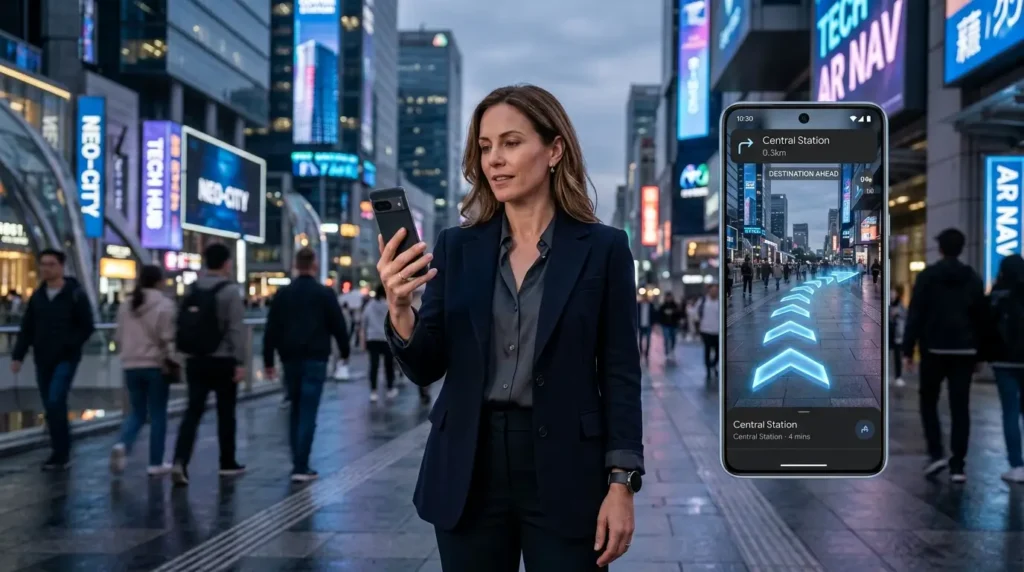
We’ve all experienced the “GPS drift” where you start walking only to realize you’re going the wrong way. In 2026, AR (Augmented Reality) navigation has reached near-perfect accuracy. By using your phone’s camera, Google Maps identifies your surroundings and overlays giant 3D arrows onto the street.
Walking directions for the modern explorer
Tap the “Live View” button while in walking mode. This uses Global Localization technology, combining Street View images with AI to orient you in seconds. It is arguably the most helpful feature for tourists in dense urban environments like Tokyo or London.
6. Data-Free Reliability: Mastering Offline Maps 📶
Reliable internet is not a guarantee, especially when traveling internationally or through national parks. Professional bloggers always download their destination maps in advance. This ensures you can still search for “hospital” or “gas station” without a single bar of LTE.
Simply go to your profile, tap “Offline Maps,” and select the custom area you want to save. These maps are updated automatically when you reconnect to Wi-Fi, ensuring you always have the latest road data without the high roaming costs.
7. Stress-Free Commuting: Save Parking Location Instantly 🚗
Forget wandering around a concrete parking garage for 30 minutes. Saving your parking spot is a one-second task that saves a world of headache. When you arrive, tap your blue location dot and select “Save parking.”
You can even add a photo of the nearby pillar (e.g., Section 4D) or set a parking meter timer. This data is stored locally and syncs across your devices, so you can even find your car using your smartwatch.
Key Features Comparison for 2026 Travelers 📊
| Feature | Best Use Case | Data Needed |
|---|---|---|
| Live View AR | Dense cities, walking | High |
| Offline Maps | International travel, remote areas | None |
| Incognito Mode | Privacy, surprise planning | Standard |
Google Maps SEO and AEO Optimization Tips 📝
As an SEO consultant, I have to mention that Google Maps isn’t just for users—it’s for business owners too. Ensuring your Google Business Profile is optimized with high-quality images and frequent updates is crucial for appearing in the “Local 3-Pack.” In 2026, AI Search Engines (GEO – Generative Engine Optimization) prioritize businesses that provide clear, structured information.
Frequently Asked Questions (FAQ) ❓
Q: How do I delete my location history on Google Maps?
A: Go to Settings > Personal Content > Delete Location History Range. You can also set it to “Auto-delete” every 3, 18, or 36 months for better privacy maintenance.
Q: Does using AR Live View drain battery significantly?
A: Yes, because it uses the camera, GPU, and GPS simultaneously. It is recommended to use it only when you are at confusing intersections rather than for the entire walk.
Q: Is Google Maps imagery updated in real-time?
A: No. Traffic data is real-time, but satellite and Street View imagery are updated on a rolling cycle, usually every 1 to 3 years depending on the location’s importance.
Q: Can I share my location with someone who doesn’t use the Google Maps app?
A: Yes. When you select “Share location,” you can copy a link to your clipboard and send it via any messaging app or email. The recipient can view your live movement in a web browser.
Q: How much storage do offline maps take up?
A: It varies. A small city area might take 50MB, while a large metropolitan region can exceed 500MB. Always check your available storage before downloading.
Mastering these seven hacks will not only make your travels smoother but will give you a level of digital literacy that few possess. If you have any other secret tips or found a new 2026 feature I missed, let me know in the comments below! Stay safe and keep exploring. 😊
“10 Google Maps Secret Hacks Every Professional Traveler Needs in 2026”에 대한 1개의 생각